
The AI Workspace Is Changing: From Chatbots to Context, Canvases, and Agents
AI is moving beyond chat. Explore how AI workspaces combine context, visual canvases, connected tools, and agents to turn scattered ideas into real work.
Reviewed by Drawsy engineering team
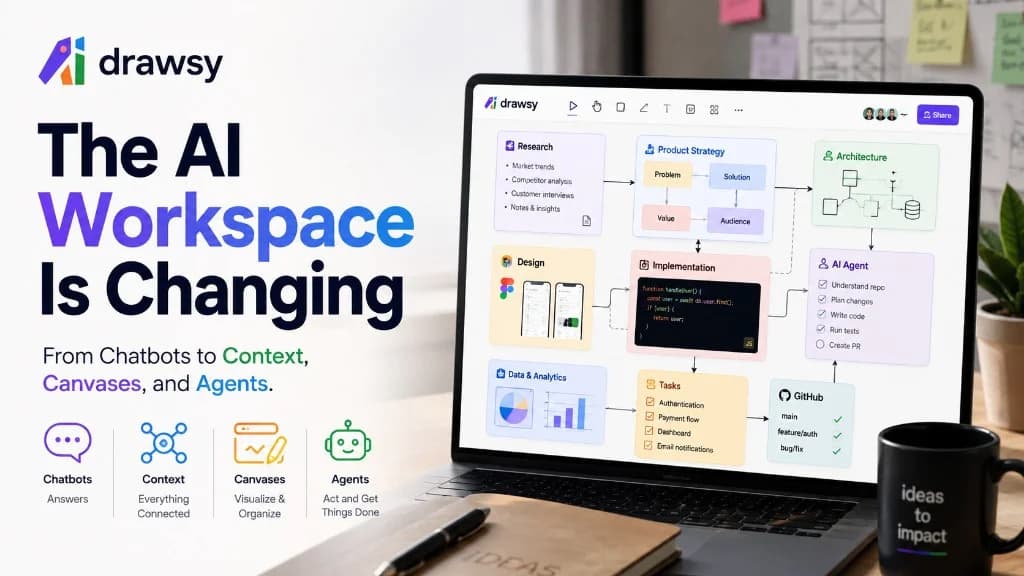
Real work is not a conversation
For the last few years, the default AI interface has been simple: a text chat box. You type. It answers. You ask again.
That loop is useful. It is also incomplete.
A software project is not a conversation. Neither is a product launch, a research program, a design system, or building a company. Real work is a pile of context, decisions, files, people, tools, relationships, plans, and actions.
That is why the next wave of AI products looks less like chatbots and more like workspaces — places where context stays visible, canvases show structure, and agents can act without forcing every idea through another thread.
The problem with the AI chat interface
Picture a new product. You might have customer interviews, requirements, screenshots, competitor research, Figma files, architecture diagrams, GitHub repos, Slack threads, docs, spreadsheets, analytics, roadmap items, code, tasks — and a stack of AI chats.
All of that matters. Your assistant usually sees only what you paste in.
So the workflow becomes a human integration layer:
Intelligence is not the bottleneck — the workspace around AI is.
- The model may be strong.
- The workspace around it is still fragmented.
- That fragmentation is the productivity tax.
AI is moving from answers to action
Early generative AI mostly produced answers: write this, explain that, summarize this, generate some code.
The next phase is different. Systems increasingly work with tools, files, apps, and external context.
Instead of “tell me how to fix this,” you can ask: “understand the project, find the problem, plan the fix, implement it, and test it.”
That is the shift from an AI assistant toward an AI agent — systems that can inspect repositories, call tools, run tests, debug, and patch. Coding agents are becoming a primary development interface, not only autocomplete.
See also: what AI coding agents are and how local agents meet an AI canvas.
Agents create a new problem: context
More capability does not automatically mean better work.
An agent still needs to know what you are building, why, what was already decided, which constraints matter, which files count, which tools to use, what to change, and what to leave alone.
That is why context — and context engineering — matters more than ever. The prompt is one piece. The workspace is the larger design.
From prompt engineering to context engineering
Compare two requests.
Request A: “Build authentication.” That is a prompt.
Request B: requirements + architecture + schema + user flows + design + existing auth code + constraints + tests → then build authentication. That is context.
The second system does not always need a smarter model. It needs better information around the task.
So the useful product question is not only “how smart is the model?” It is also: how well does the workspace help the model understand the work?
Prompt only
Context + task
This is where the canvas becomes important
Chat is linear. A canvas is spatial. That sounds small. It is not.
A conversation forces sequence: message → response → message → response.
A canvas can hold relationships: research feeding requirements, architecture branching into design and APIs, implementation connecting back to the project.
You can see structure, move pieces, connect them, group them, compare them, and ask AI to work with what is already on the board — the core idea of an AI canvas.
Linear chat
Visual canvas
AI canvases are becoming a real interface
This is not only a Drawsy thesis.
Google’s Canvas in AI Mode is positioned as a space for longer projects and plans, including coding and interactive tools. Sheets Canvas turns spreadsheet data into interactive visual apps.
GitHub has described canvases as useful when work does not fit a linear conversation — when people need to visualize, combine sources, and act.
Other products are putting coding agents onto visual agent canvases for local workflows. The direction is consistent: AI is moving from a place you talk to into a place where you work.
What is an AI workspace?
A useful definition:
> An AI workspace is the environment where your context, tools, AI agents, and work come together.
In practice it usually includes:
- Context — docs, notes, research, requirements, conversations
- Visual thinking — diagrams, flows, maps, plans, relationships
- Connected tools — GitHub, Notion, Slack, Drive, Jira, Gmail, and more
- AI — models and agents that can read the workspace
- Execution — code, prototypes, tasks, plans, outputs
- Local environment — files, projects, terminals, developer tools
From scattered tools to one context
Most companies already have useful systems. The pain is the gap between them.
Each tool is useful. The gap between them is the hard part.
- Drawsy’s starting point is simple: your work already exists.
- Bring context together instead of rebuilding it inside every AI conversation.
- When the pieces connect, AI gets closer to the environment humans already work in.
One canvas. Many ways to think.
A canvas is not only “diagramming.” The same surface can hold different kinds of work:
- Systems — architecture, APIs, infrastructure
- Knowledge — notes, docs, reference
- Research — sources, findings, comparisons
- Planning — roadmaps, tasks, priorities
- Design — flows, wireframes, exploration
- Apps — prototypes, code, interactive work
- Presentations — stories, reports, communication
From scattered context to real work
A strong AI workspace helps work move forward — not just produce longer chats.
Prompt loop
Workspace progression
- The goal is not longer AI conversations.
- The goal is progress: scattered → understood → structured → action → real work.
Then comes the agent
A canvas alone is not enough. You still need execution.
Humans hold direction, judgment, and creativity. Agents can explore, implement, and iterate on scoped tasks — with the board as shared context.
That is a healthier division of labor than pretending either side owns the whole job.
Why local AI agents matter
For developers, the workspace gets more interesting when it can reach the machine you already use: project files, Git, terminal, coding agent.
You should not need a brand-new hosted environment just to get AI help. Connect the visual workspace to the environment you already trust.
That is the idea behind Drawsy Companion.
Drawsy Companion: canvas meets your machine
Companion is a local runtime that connects the Drawsy web canvas to supported coding agents and tools on your computer.
You keep Codex CLI or OpenCode CLI — one is enough. Companion bridges the visual workspace to the local project.
Details and setup: Companion download and local AI coding agent + AI canvas.
One coding agent is enough — pick Codex or OpenCode.
Your files should remain your files
Local-first tooling should not force a full project upload just to get help.
A local workflow can let you choose a project on disk and let the local runtime mediate access.
Important precision: local runtime does not automatically mean the AI model is offline. Whether prompts or code reach an external model depends on the agent, provider, and configuration.
Good products make that data path understandable — not just a vague “private” badge. Least-privilege access and human approval for sensitive tool actions remain good practice for agent systems.
The workspace is the missing layer
Put the pieces together and the picture is not “another chatbot,” “another editor,” or “another project tool.”
It is a layer that connects thinking → context → AI → execution.
What this means for different people
An AI workspace should not be developer-only. The same canvas can support different workflows:
- Developers — architecture → code → tests → debugging → deploy
- Product managers — feedback → problems → opportunities → features → priorities → roadmap
- Researchers — sources → evidence → patterns → insights → recommendations
- Designers — brief → research → flows → wireframes → UI → prototype
- Founders — idea → market → customer → product → technology → launch
The next generation of AI products won’t just answer
The most interesting products will not only win on context-window size or model brand.
They will answer: what should AI be able to understand, see, access, and act on?
That is a workspace problem — context, structure, tools, agents, and human control for decisions that matter.
Together, AI starts to feel less like a chatbot and more like a collaborator inside the work.
From chat interface to work interface
The evolution looks roughly like this:
- Chat does not disappear.
- Chat becomes one interface inside the workspace, not the whole workspace.
The future may be less about prompting alone
Prompt craft still helps: clearer asks, examples, formats.
As agents take actions, another skill rises: context design — what the AI should know, access, remember, use, and when a human must approve.
Those questions matter once AI moves from generating text to changing real systems.
The real AI productivity problem
AI can make individuals faster. If the surrounding workflow stays fragmented, the gains leak into context switching.
You can generate code quickly and still spend an hour hunting the right requirement, the latest design, the customer ask, the architecture decision, the current doc version, the agent’s diff, and the review checklist.
The next leap is not only “generate more output.” It is reduce the distance between context and action.
Where Drawsy fits
Drawsy is built around one line: one canvas, many ways to think.
Bring work together. Connect tools. Organize context. Let AI understand it. Use agents when work needs to happen. Keep humans in charge of decisions that matter.
For developers, Companion extends that workspace to the local machine with Codex CLI or OpenCode. For teams, connectors pull external context onto the board. For product, research, planning, design, and systems work, the canvas is the visual layer for relationships.
The result is not only an AI that answers questions. It is a workspace designed to help turn ideas into real work.
Start on the canvas at https://drawsyai.com, explore how to start, or open the AI workspace definition.
The next interface for AI may be the workspace
AI can increasingly understand repos, use tools, edit files, prototype, analyze data, work with connected apps, operate coding environments, and collaborate with humans.
Interfaces are evolving from linear chat toward visual, persistent workspaces — which is why Google, GitHub, and others are investing in canvas-style experiences.
Canvas gives structure. Connectors give access. Agents give action. Humans give direction and judgment.
That combination is the foundation of the AI workspace — and where this category is heading.
Frequently asked questions
What is an AI workspace?
An AI workspace is a digital environment that combines AI with the context, information, tools, and workflows needed for real work — a persistent place to organize information and take action, not only a chat thread.
What is an AI canvas?
An AI canvas is a visual workspace where people organize information, ideas, plans, relationships, and interactive outputs while working with AI.
What is the difference between an AI assistant and an AI agent?
An AI assistant typically generates or transforms information in response to requests. An AI agent can use tools and perform multi-step actions toward a goal.
What is context engineering?
Context engineering is designing the information, tools, permissions, and environment available to an AI system so it can perform a task effectively.
What is a local AI coding agent?
A local AI coding workflow lets an agent work with a development environment and project resources on your computer. The model itself may still be hosted remotely depending on agent and configuration.
What is Drawsy Companion?
Drawsy Companion is Drawsy’s local runtime for connecting the Drawsy web canvas to supported coding agents and local development resources.
Can Drawsy work with Codex or OpenCode?
Yes. Drawsy Companion connects the Drawsy canvas with supported local coding agents such as Codex CLI and OpenCode CLI.
Do I need both Codex and OpenCode?
No. One supported coding agent is enough.
Try the new way to work
Bring ideas, context, tools, and AI together on one canvas — then connect local agents when you need execution.
Related reading
- What Is an AI Workspace?Canonical definition of the AI workspace.
- What Is an AI Canvas?Visual boards where AI reads your context.
- What Is Context Engineering?Designing what agents receive and when.
- Drawsy CompanionLocal bridge to Codex CLI and OpenCode.
- How to Use a Local AI Coding Agent with an AI CanvasLearn how local AI coding agents work with Codex CLI and OpenCode, why local project access matters, and how an AI canvas can turn code, context, and ideas into one visual workspace.
- Context Engineering for AI Agents: How to Give AI the Right InformationA practical guide to context engineering for AI agents — how to design instructions, knowledge, memory, tools, and feedback so agents make better decisions on real projects.