
Context Engineering for AI Agents: How to Give AI the Right Information
A practical guide to context engineering for AI agents — how to design instructions, knowledge, memory, tools, and feedback so agents make better decisions on real projects.
Reviewed by Drawsy engineering team
Strong models still fail with weak context
Most people notice agent failures as “the model hallucinated” or “it wrote bad code.” Often the real issue is quieter:
The agent did not have the information a careful engineer would have checked first.
Stale docs. Wrong files. A truncated repo view. No record of why the team rejected an approach two years ago. Tool output dumped in without meaning. Any of that can push a capable model into a confident wrong turn.
Context engineering is the craft of designing that information environment — not polishing one magic prompt.
The goal is not to feed the agent everything. The goal is to feed it what matters for this task.
What is context engineering?
Context engineering means deciding what an AI agent should see, how that information should be structured, and when it should arrive.
A toy agent can look almost trivial:
What a real project agent needs
On a real product, the model is only one part of the system. The surrounding stack — project context, memory, tools, documents, decisions, tool results — decides what the model can actually reason about.
Context engineering vs prompt engineering
Prompt engineering asks: how should I phrase the instruction? Example: “Review this function and explain the bug.”
Context engineering asks: what should the model already know before it reviews that function?
Often that means callers, schema, API contracts, tests, recent commits, architecture decisions, error logs, project conventions, and the user’s real goal.
Prompts still matter. For multi-step agents, the context pipeline becomes system design.
| Prompt engineering | Context engineering |
|---|---|
| How should I instruct the model? | What should the model know? |
| Focuses on wording | Focuses on the information environment |
| Usually one interaction | Can span a whole workflow |
| Prompt text | Retrieval, memory, tools, state, instructions |
| "What should I ask?" | "What should the agent access?" |
Why context matters more for AI agents
A chatbot can sometimes answer from general knowledge. An agent has to pursue a goal: inspect, choose a tool, act, read the result, update the plan, act again, validate.
Every step creates or consumes context.
Ask a coding agent: “Add authentication.” That sentence is not enough to do the work safely.
It needs the repo shape — frontend, backend, database, auth, routes, tests, env, deploy — plus which provider you already use, how sessions work, which routes are protected, security conventions, deploy constraints, and past architecture decisions.
Without that, you get code that looks fine and still breaks the system. That is a common failure mode for AI coding agents that only see a thin slice of the codebase.
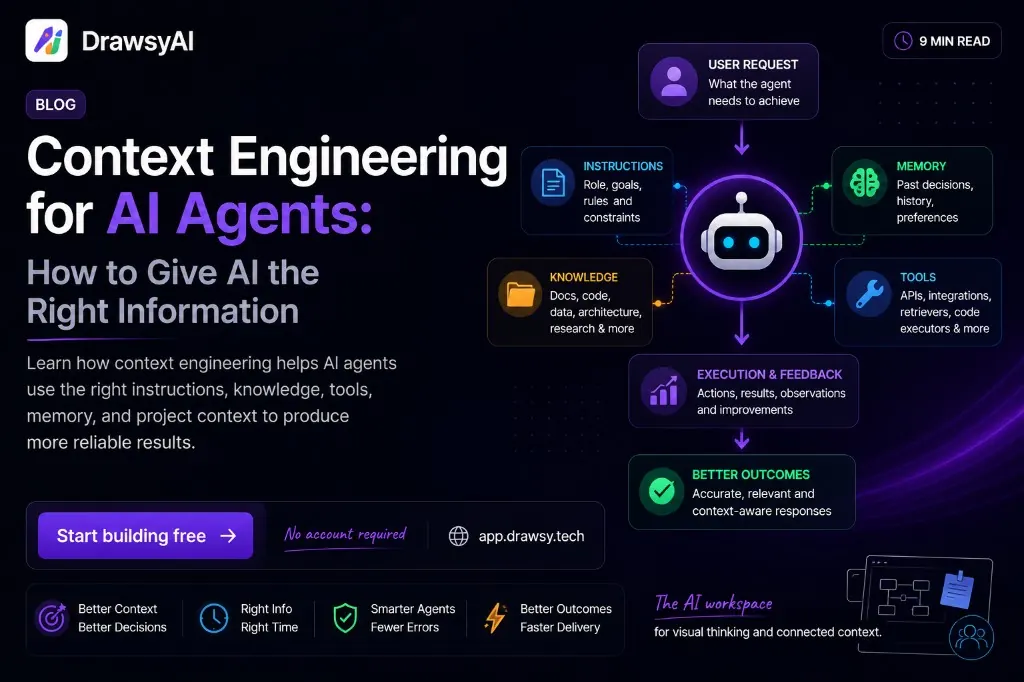
Five layers of useful agent context
There is no single universal architecture. These five layers are a practical map when you are designing agent systems — or when you are trying to debug why an agent went sideways.
1. Instructions
Role, task, constraints, output shape, safety rules, project conventions.
For a coding agent, that can look like:
Follow the existing TypeScript conventions.
Do not introduce a new authentication library.
Run the existing test suite after changes.
Do not modify database migrations unless required.- Instructions set boundaries. They are not the whole project truth.
2. Knowledge
Docs, repos, APIs, databases, files, search results, retrieved notes — anything that describes the world the agent is changing.
Relevance beats volume. Dumping the whole knowledge base into the window rarely helps. The system has to find what matters for this task. That is the core of connected context.
3. State and memory
Some facts should survive across runs. Example: the team already chose PostgreSQL because analytics depends on it.
That one decision is often more valuable than another generic explanation of PostgreSQL. Good memory keeps what stays useful — not everything that ever happened.
Previous decision
Use PostgreSQL rather than MongoDB.
Reason
Existing analytics infrastructure already depends on PostgreSQL.
Impact
New features should use the existing database layer.
4. Tools
GitHub, databases, APIs, filesystems, browsers, terminals, deploys, observability — tools expand what an agent can do.
They also expand what the agent must understand: when to use a tool, what inputs it accepts, what the output means, and what permissions are allowed. A powerful tool with weak context still produces weak results.
5. Execution feedback
After the agent acts, reality talks back: failing tests, error logs, lint output, diff review notes.
That feedback should enter the next step’s context. Long-running agents need this loop more than chatbots do.
More context is not always better
Suppose you ask an agent to fix a login bug and hand it the entire repo, every issue, a year of Slack, all logs, every deploy, the full docs site, and hundreds of old chats.
Technically that is more context. Practically it is often a worse problem: noise, stale claims, contradictions, duplicates, and cost.
A tighter pack — login service, auth middleware, related model, recent auth commit, failing test, current error — is smaller and usually stronger.
Context engineering is not “max out the window.” It is select and structure the right context.
Context engineering for coding agents
Software hides decisions. A teammate may know: “We don’t use that service here — it raced two years ago.” That fact might live in an old PR, an ADR, Slack, a comment, or someone’s head. The current file may never say it.
An agent that only reads today’s code can miss the constraint and “improve” the system in the wrong direction.
A stronger coding-agent context looks more like a pipeline than a paste dump:
- Do not expose the entire history of the project by default.
- Expose the history that explains why the system looks the way it does now.
A practical workflow you can use today
If you are building or steering an agent, start with the task — not the model brand.
Step 1 — Define the task
Make the goal specific enough to verify.
Weak: “Improve the application.” Stronger: “Add pagination to `/api/projects` without changing the existing response shape.”
Step 2 — Identify required context
Ask what an experienced engineer would open before editing:
API implementation
Database query
Existing response type
Frontend consumer
Tests
Pagination conventions
Step 3 — Retrieve only what is relevant
Skip “load everything.” Prefer semantic retrieval, keyword search, metadata filters, repo structure, dependency edges, and task-specific routing.
Step 4 — Separate facts from instructions
Agents handle mixed soup poorly. Keep facts, constraints, and the task distinct so the model can weight them correctly.
Facts
- API returns 20 projects
- Frontend expects
projectsarray
Constraints
- Do not break response shape
- Use existing DB abstraction
Task
Add cursor-based pagination
Step 5 — Preserve important decisions
When a decision matters, store the decision, why it was made, what it affects, and what it replaces. Future agents should not re-litigate settled architecture every run.
Step 6 — Validate, then feed the result back
Generation is not the end. For engineering work: plan → implement → test → inspect failures → update context → fix → validate. The validation result becomes context for the next move.
Treat context as a pipeline
A useful mental model for many AI apps:
Context is a pipeline, not a text box.
How to tell if your context is good
Before you send a pack of context to an agent, run a fast checklist:
- Relevant? Does this help with the current task?
- Sufficient? Can a careful engineer decide with this information?
- Current? Could any of it be outdated?
- Consistent? Are sources or instructions fighting each other?
- Traceable? Do you know where the critical facts came from?
Bigger models do not replace better context
As models improve, more of the hard work moves outward — from “how smart is the model?” to “what did we give it to work with?”
A strong model with poor context still makes bad calls. A weaker model with sharp context can often outperform it on a real codebase.
That is why context engineering belongs next to model choice when you care about reliable agents.
Where AI workspaces help
An AI workspace is one way to keep the right pieces next to each other: ideas, docs, code links, decisions, diagrams, and agent work — instead of scattering them across Slack, Notion, GitHub, whiteboards, and chat.
The point is not “give AI more stuff.” It is make relationships visible so both humans and agents can use them.
On Drawsy, that often looks like idea → architecture → documentation → code → decisions → AI → implementation on one board. If you are pairing that visual layer with local coding agents such as Codex CLI or OpenCode, read how to use a local AI coding agent with an AI canvas.
Try the canvas at https://drawsyai.com, skim how to start, or see Drawsy agents when you want AI that works with the board — not beside it.
Takeaway
Context engineering is not the hunt for a perfect prompt. It is designing the information environment around an AI system.
For agents, that environment usually includes instructions, project knowledge, retrieval, memory, tools, tool results, constraints, and execution feedback.
Give the agent what it needs, when it needs it, in a form it can use.
As agents take on longer work, that design choice can matter as much as the model itself.
Frequently asked questions
What is context engineering?
Context engineering is deciding what information an AI agent should receive, how it should be structured, and when it should be provided — including instructions, knowledge, memory, tools, and execution feedback.
How is context engineering different from prompt engineering?
Prompt engineering focuses on how you instruct the model. Context engineering focuses on the information environment around the model: retrieval, memory, tools, state, and constraints across a workflow.
Why do coding agents need better context?
Software systems carry implicit decisions — old PRs, ADRs, Slack threads, conventions — that may not appear in the current file. Without that context, agents can write plausible code that is wrong for the real system.
Is more context always better?
No. Irrelevant, stale, duplicated, or contradictory information can make the task harder. Good context engineering selects and structures what matters for the current task.
What are the main layers of agent context?
A practical map is instructions, knowledge, state/memory, tools, and execution feedback. Real systems may combine these layers differently, but each answers a different failure mode.
See context on a visual workspace
Keep requirements, architecture, and decisions next to the work — then connect agents when you are ready.
Related reading
- AI workspace thought leadershipFrom chatbots to context, canvases, and agents.
- What Is Context Engineering?Canonical definition of context engineering as a discipline.
- What Are AI Coding Agents?How coding agents use repository and project context.
- Local AI coding agent + AI canvasHow Codex CLI / OpenCode connect to a visual workspace.
- What Is Connected Context?Why linking tools and decisions matters for grounded AI.
- The AI Workspace Is Changing: From Chatbots to Context, Canvases, and AgentsAI is moving beyond chat. Explore how AI workspaces combine context, visual canvases, connected tools, and agents to turn scattered ideas into real work.
- How to Use a Local AI Coding Agent with an AI CanvasLearn how local AI coding agents work with Codex CLI and OpenCode, why local project access matters, and how an AI canvas can turn code, context, and ideas into one visual workspace.